Building Once, Launching Everywhere: Why Flutter Is a Smart Choice for Cross-Platform Apps
Author: Connor Willans
30 June, 2026
In today’s digital environment, it’s no longer enough for businesses to simply have an app. Users want software available to them anytime, and anywhere. Whether that means using a phone while traveling, a tablet in the field, a desktop computer in the office, or a web browser at home. This shift has made cross-platform development more important than ever.
Even with this change, many businesses will still face challenges building and deploying software on all the different platforms, such as mobile vs desktop applications. You may have an iOS app written in Swift, and a desktop app in C#. While they may look similar visually, the code itself can differ drastically. This makes new features, bug fixes, and updates unnecessarily difficult to implement, as developers will have to make changes to each version separately. Sinking more time and money than needed.
Recently, one of our longstanding clients noticed this very issue. Their primary application for document management already had thousands of users, all on different platforms: iOS, Android, and Windows. Each of these platforms were written in different programming languages, Objective-C for iOS, Kotlin for Android, and C# for Windows. Their main focus this year was a complete overhaul of the user interface, as well as making some general improvements to the user experience. However, the different codebases meant we would have to perform the same overhaul, and improvements three separate times. Even though the apps shared the same exact name and branding, there was no overlap in code. With this problem presented to us, we suggested Flutter.
Flutter is a cross-platform development framework that allows teams to build applications for iOS, Android, web, and desktop from a shared codebase. Rather than treating each platform as a completely separate project. This can allow for quicker and cheaper development time, one-time updates, and way less headaches.
1. The Problem with Building the Same App Multiple Times
Building an application for multiple platforms used to mean one codebase per platform. A company might need one development effort for iOS, another for Android, another for the web, and another for desktop. Often requiring multiple developers who all have different skillsets in different languages. This can quickly get out of hand, not only in terms of time and money, but an increased difficulty in managing every single one. A bug fixed on iOS may still exist on Android. A design update may look slightly different on desktop than it does on mobile. Over time, and as the complexity of the app scales, these differences compound. Leading to frustrated users.
For businesses, the issue is not just technical. It affects timelines, budgets, communication, support, and the ability to respond quickly when users need changes.
2. One Codebase, Multiple Platforms
One of Flutter’s biggest advantages is the ability to build once, and deploy anywhere. If developed correctly, multiple platforms can be created within the same amount of time it would take to create a single platform separately. This does not mean every platform is exactly the same behind the scenes. There may still be cases where specific platform behavior or integrations are needed. However, the core application experience, business logic, user interface components, and workflows can often be shared across platforms.
Let’s showcase an example, a login screen. Bundling the UI, functions, API calls, and error handling together, you’re probably looking at roughly 500 lines of code. If you wanted to build an application for iOS, Android, Desktop, and Web, that’s four different platforms, and four different programming languages. Now you’re looking at 2,000 lines of code, that all do the same exact thing that 500 lines accomplish. If a bug pops up, you may have to fix it 4 separate times. With Flutter, you’re back to looking at 500 lines again, and this time, you only have to fix the bug once.
3. Faster Development and Easier Updates
As mentioned before, Flutter uses a single codebase for any and all platforms, no matter how many you want to support. Android, iOS, Windows, macOS, Linux, and all web browsers can be developed, released, and maintained. Bugs, updates, new features, and everything in between only require one change, not six. This means faster turnaround times, and more happy users.
Flutter isn’t just appealing from a business standpoint, developers love it too. Flutter supports hot reloads and hot restarts. Hot reloads allow developers to see their changes in real time. Whether it’s shifting the position of a button, or an entire change to a screen, hot reloading acts much like refreshing a webpage, seeing live updates as you save a file. Hot restarts take it a step further, acting much like rebuilding the app. Instantly restarting the app flow. Both of these are incredibly valuable in developer environments. Speaking from experience, making even the smallest of changes can take 10+ minutes to view. Without Flutter, you may make a small change to the size of a font, but have to wait 10 minutes for the app to rebuild, and traverse back to that screen the font was changed on. It may seem small, but these rebuilding periods can compound very quickly. With Flutter, hot reloads apply in seconds, removing the need to rebuild, reauthenticate, and renavigate.
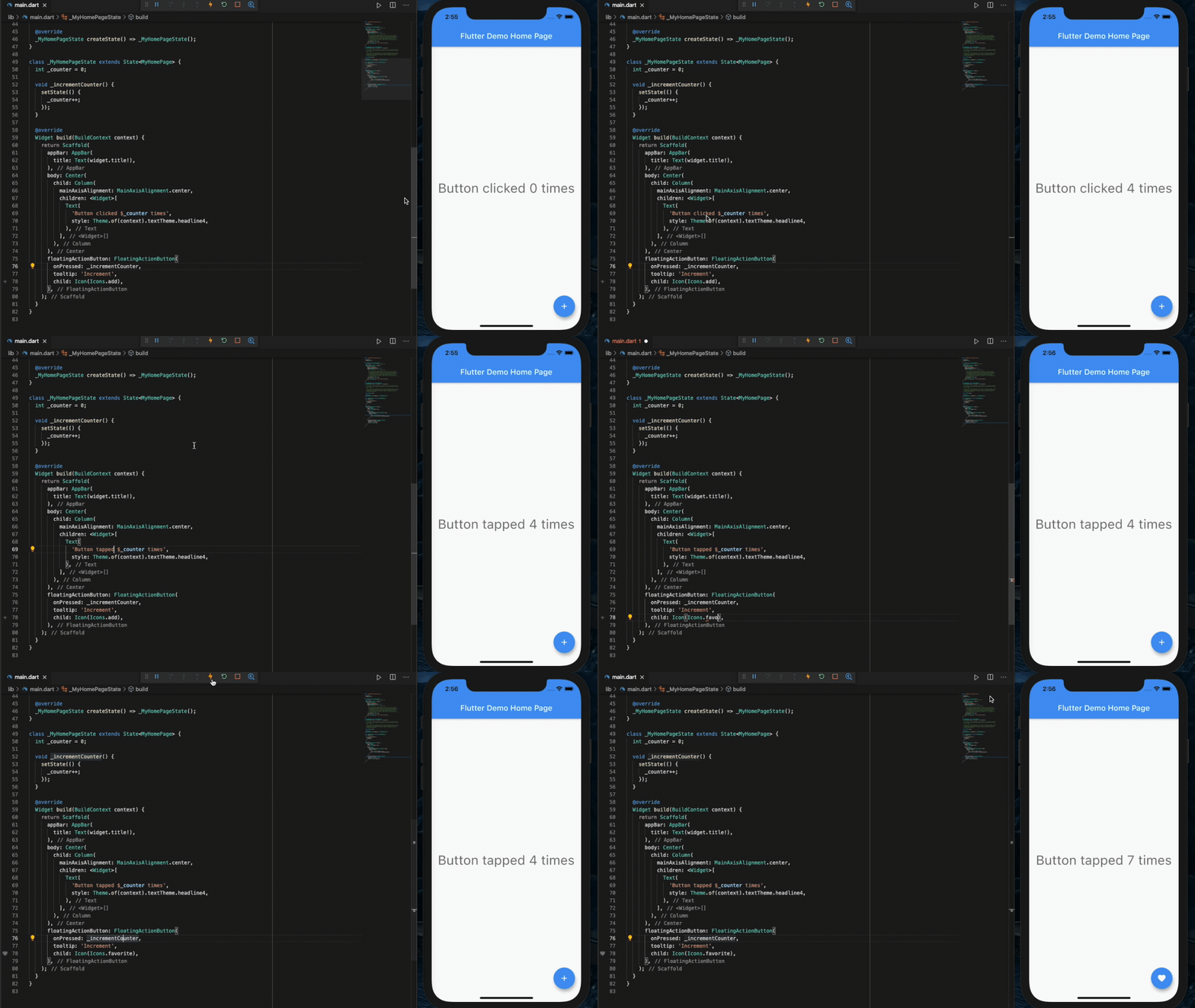
Flutter Hot Reload Demonstration [Source]
4. A Consistent Experience for Users
A strong application is not just about functionality. It is also about consistency. When users move between devices, they should not feel like they are learning a completely different product each time. A mobile app, desktop app, and web app should feel connected. Buttons, menus, navigation, colors, workflows, and terminology should all feel familiar.
This is another reason why Flutter feels so fluid. Developers can build reusable interface components and designs. Making it easier to keep the app experience consistent across platforms. For business applications, this can be especially valuable. An employee may use a desktop computer at the office, a phone while traveling, and a tablet while working in the field. If the app looks and behaves consistently across those devices, users can move between them more easily and with less friction.
5. Shared Data Across Devices
Cross-platform development is not only about making the app look and feel the same, but also function the same. A user may start a task on their computer, continue it on their phone, and review it later from a tablet or browser. With a properly designed cross-platform application, users can access the same account, data, documents, dashboards, forms, reports, and workflows from multiple devices.
Flutter works well in this type of environment because it can provide a consistent frontend experience while connecting to centralized APIs, cloud services, databases, and authentication systems. The only real difference between apps is the screen real estate, all core functionality remains the same. This is especially important for modern business applications. Teams are no longer tied to a single device or location.
6. Strong Community and Package Support
Another reason Flutter has become popular is its strong developer community and package ecosystem. Many common application needs already have available packages and tools that can help speed up development.
For example, applications often need features such as authentication, maps, camera access, notifications, file handling, charts, PDF viewing, state management, payment integrations, and more. In many cases, Flutter developers can use existing packages instead of building every feature completely from scratch.
This does not remove the need for careful development, but it can help teams move faster and avoid reinventing the wheel. A strong community also means there are more examples, documentation, troubleshooting resources, and shared best practices available.
For businesses, this matters because it means Flutter is not a niche or experimental technology. It is widely used, actively supported, and backed by a large ecosystem of developers and tools. Not to mention, Flutter is developed and supported by Google. So there’s no shortage of improvements and new features. At the time of writing, the Flutter team released version 3.44 in late May, which introduced a lot of useful new developer tools. One of those are widget previews.
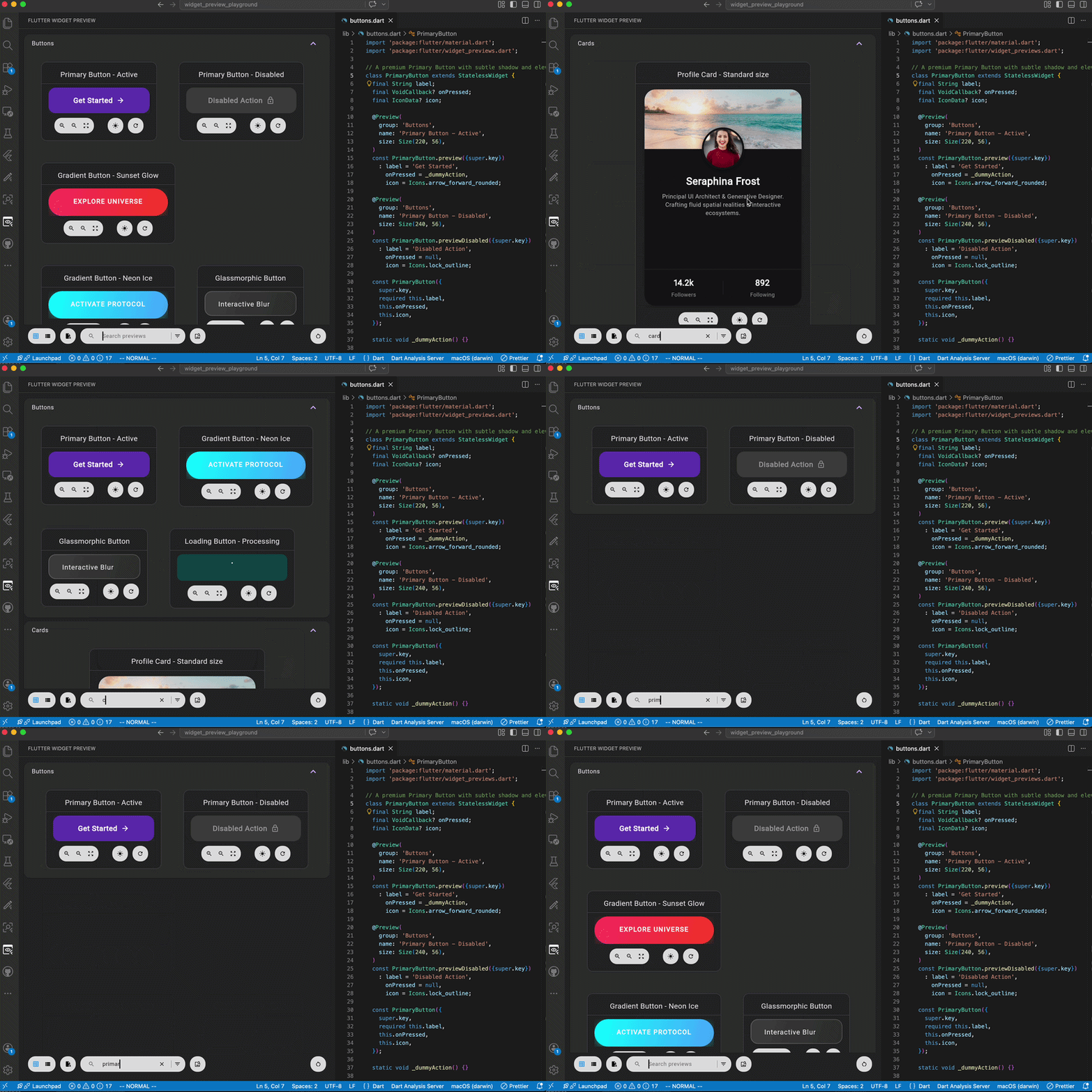
Flutter Widget Preview Demonstration [Source]
No longer do you have to create a widget_test.dart file to shove all your components into. There’s now a standalone flow to build out any and every button, grid, popup, etc. Even allowing you to view how they look on different platforms, from a single device. Google shows no sign of stopping their continued development of Flutter, all the more reason to adopt this open-source UI software development kit.
7. When Platform-Specific Customization Still Matters
While Flutter can be extremely useful, it is important to be realistic. Cross-platform development does not mean every platform can or should be treated exactly the same. As mentioned previously, screen real estate is an important factor to consider. On mobile devices, you’re looking at a much smaller and more narrow screen, while desktop / websites are larger and wider. So components you develop on desktop may not fit or look correctly on mobile. Plus, mobile apps focus on touch and gesture based, compared to desktop / websites where it’s more mouse and keyboard.
Thankfully, Flutter makes it incredibly easy to handle these concerns. Dart, the backbone of Flutter, has built-in device checks, allowing you to easily detect what platform the user is on. Using this, you can conditionally render different sized, or completely different components and screens. This was a feature our client wanted. When browsing through thousands of different data points, they wanted it to look different on mobile vs computer. Making use of the larger screen sizes. Using these device checks, it’s as simple as “if iOS or Android, push to mobile_browse.dart, and if not, push to desktop_browse.dart.” You can still reuse all the same data and functions, but simply change how it’s presented. This is why a successful Flutter project still requires thoughtful planning, experienced development, and thorough testing on each target platform.
Conclusion
Flutter gives companies a practical way to build applications for the modern multi-device world. Flutter is especially well suited for many modern applications because it supports the way companies increasingly need to build software. Businesses often want applications that work across mobile, desktop, and web without maintaining several completely separate systems.
This makes Flutter a strong fit for internal tools, customer portals, dashboards, field service apps, data-entry systems, document viewers, workflow applications, and other software that needs to be accessible across different environments.
By using a shared codebase, companies can reduce development complexity, improve consistency, simplify maintenance, and create a more flexible foundation for future growth. Instead of creating and maintaining separate apps for iOS, Android, web, and desktop, teams can use a shared codebase to deliver a more consistent experience across platforms. If a project starts as a mobile app, Flutter can make it easier to expand to web or desktop later. If a company needs all platforms from the beginning, Flutter can help keep the project more unified from day one.
When used right, Flutter can provide an efficient and scalable foundation for building software that works across the devices people use every day. We here at Xorbix have been using Flutter for years, and are constantly learning and improving to deliver the best cross-platform software possible.