
Working with Claude Instructions
Author: Tom Campbell
29 September, 2026
You open Claude.ai to work on a client proposal, an operations problem, or maybe a technology decision. Before you get to the actual question, you type the usual briefing.
We use Microsoft. Keep it practical. Explain the business impact. Please do not invent a budget.
Tomorrow, you’ll do another task and give Claude the same orientation speech again.
Account-wide instructions and project instructions give those reminders a permanent home. The useful distinction is scope: account instructions describe how you generally work, while project instructions explain the assignment in front of you.
Account instructions establish your business defaults
Account-wide instructions apply across all your conversations with Claude. Use them for your role, preferred approach, and the level of detail you need to make decisions. Or leave those stupid icons out of my research reports (sorry, a pet peeve). In the current Claude experience, look for Instructions for Claude under Settings, in Account. Menu labels may vary as interface updates roll out.
For example, a business or technology leader might start with:
I lead a company that delivers software and AI solutions. For business questions, explain the impact on cost, delivery, and ongoing support. Use plain language. State your assumptions and challenge weak ones. When comparing options, recommend an approach and explain the tradeoffs. Keep answers concise unless the task needs detail.
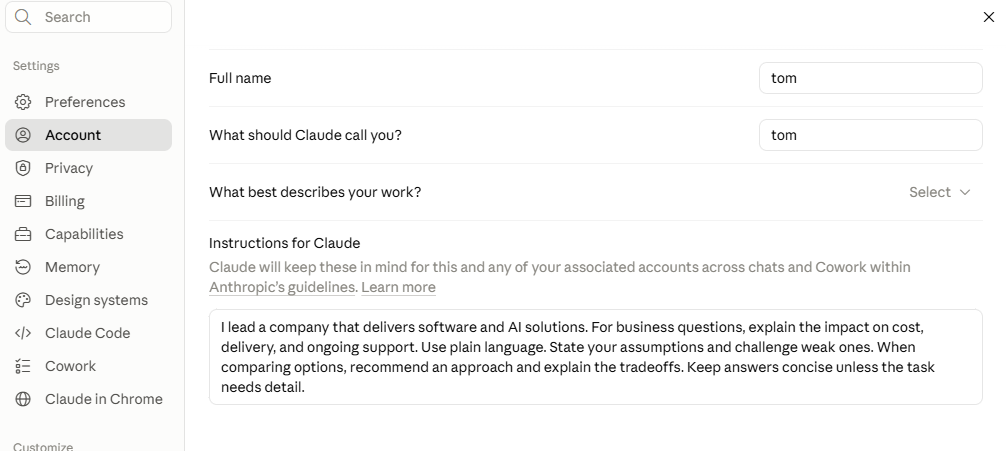
That gives Claude a useful briefing before you ask about a proposal, staffing plan, or software investment. You have told it what matters to you. A list of twelve technically possible options is less useful when you need to decide which one the business should pursue.
Try to keep this instruction very focused. Account instructions can become the junk drawer of your AI setup: a client deadline, an old pricing rule, and a technology requirement from a project that ended six months ago. Those details will influence unrelated conversations. Put client-specific guidance into the client’s project and remove account instructions when they are no longer relevant.
Project instructions define the assignment
Project instructions apply to conversations inside that project. This is where you explain who the customer is, the business goal, and the boundaries of the work. A useful project briefing should answer the questions you would expect a colleague to ask before getting started.
Imagine you are preparing a proposal for a manufacturing customer. Your project instructions could say:
This project is a proposal to reduce the time our customer spends preparing quotes. Use the attached discovery notes and approved scope. Favor approaches that work with the customer’s existing Google environment. Separate confirmed requirements from assumptions. Do not invent pricing, delivery dates, or ROI figures. Identify the information needed before making a commitment.
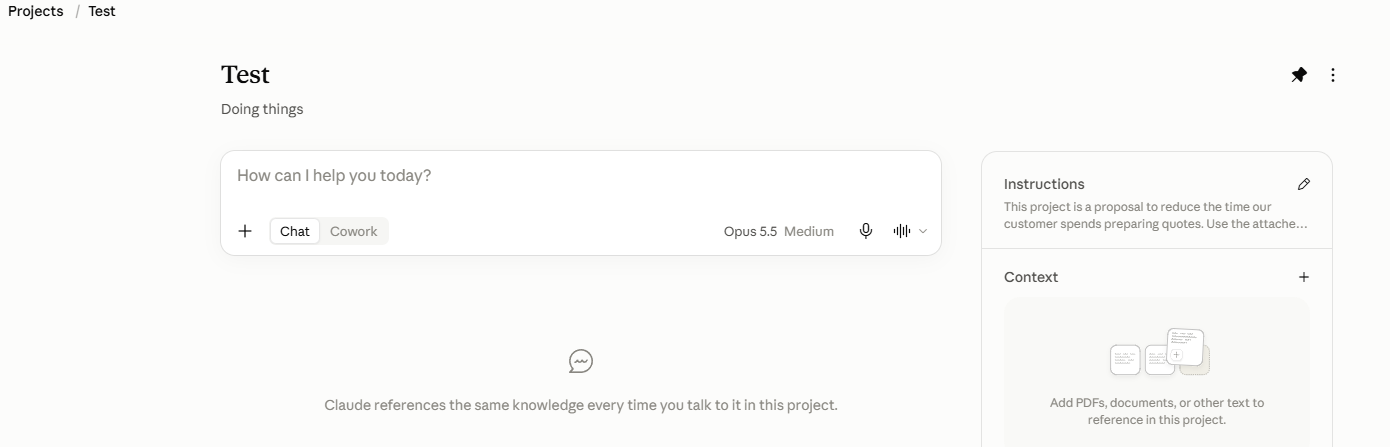
Add the discovery notes, requirements, and relevant reference documents to the project knowledge base so Claude can use them across project chats. Keep those files current and identify which version is authoritative. Uploading three conflicting scope documents gives Claude three conflicting scope documents. Tell it which one was approved.
An operations manager could use a separate project for supplier reviews:
This project supports our quarterly supplier reviews. Use the attached scorecard definitions and approved supplier data. Highlight delivery and quality trends, explain their business impact, and suggest follow-up actions. Flag missing information. Do not present assumptions as measured results. Always output as a Microsoft PowerPoint presentation; follow the sample format in the project.
Now we have a clear place for each set of requirements. The customer’s proposal rules are in accordance with the proposal project. Supplier scorecard definitions belong with supplier reviews. Your preference for direct, practical recommendations can apply across both.
Make the instructions work together
The account and project instructions can reinforce each other. Your account might ask Claude to connect recommendations to business value. A project can add a specific target, such as reducing quote turnaround time or improving on-time delivery.
Conflicting instructions create trouble. If your account says, “Never write more than 500 words” and your project requires a detailed implementation plan, you have given Claude two bosses with different expectations. “Be concise unless the task requires depth” is a more useful default.
The instructions saved still need testing. Ask Claude to handle a representative business task and review the result. Did it respect the scope? Did it make up a number? Did it explain the recommendation? Tighten unclear instructions and resolve contradictions. A confident answer still needs a business owner, like you, willing to verify it.
Start with the reminders you already repeat
Open your account instructions and read what is there. Keep the guidance that helps with your business work. Move client details into the appropriate project. Delete rules that no longer make sense.
Then choose one active project and give it a useful briefing. Include the goal, relevant constraints, and the documents Claude should reference. Leave one-time requests, such as “Summarize this meeting in five bullets,” to the conversation.
You do not need to write an employee handbook for Claude. Start with the directions you keep repeating, try them on real work, and adjust what is unclear. Give the next conversation a better starting point so you can spend more time on the business decision you opened Claude to make.